






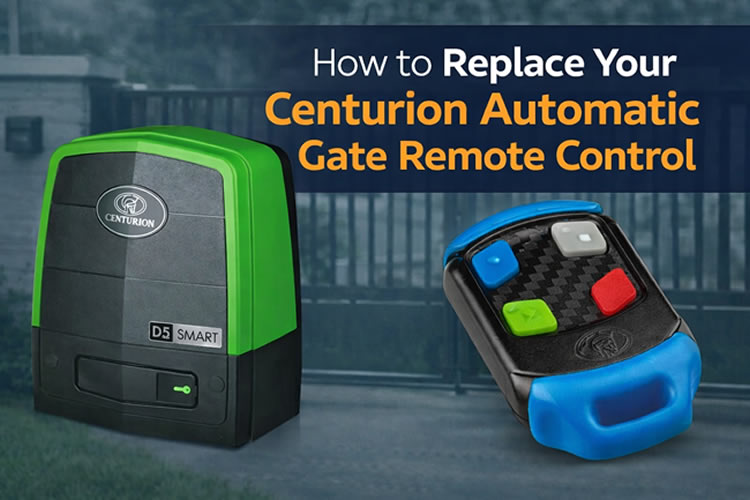
A malfunctioning, lost, or damaged Centurion automatic gate remote control can quickly become a major inconvenience. Fortunately, replacing a Centurion gate remote is usually straightforward when you know which remote model you need and how to pair it with your gate motor.
In this comprehensive guide, we’ll walk you through everything you need to know about replacing a Centurion automatic gate remote control, from identifying the correct remote to programming your new device and troubleshooting common issues.
Why You May Need to Replace Your Centurion Gate Remote
There are several reasons homeowners and businesses choose to replace their gate remotes:
- Lost or stolen remote controls
- Physical damage from drops or water exposure
- Worn-out buttons
- Battery leakage causing circuit damage
- Upgrading to newer remote technology
- Adding additional remotes for family members or employees
Replacing a faulty remote not only restores convenience but also helps maintain the security of your property.
Understanding Centurion Gate Remote Models
Before purchasing a replacement, it’s important to identify which Centurion system you have. Some of the most common Centurion remote models include:
Centurion Nova Remote
The Nova series is one of the most widely used Centurion gate remote systems and features:
- Rolling code technology for enhanced security
- Four programmable buttons
- Long operating range
- Durable design
Centurion Smart Remote Systems
Newer Centurion gate motors may support advanced remote technologies that provide:
- Improved encryption
- Better signal performance
- Enhanced user management options
Always check your gate motor model and existing remote before purchasing a replacement.
Centurion 2-Button vs 4-Button Remotes: What’s the Difference?
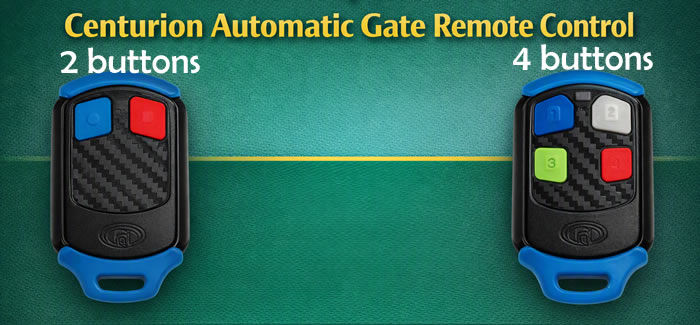
When replacing your Centurion gate remote, you’ll typically find two options available: 2-button remotes and 4-button remotes. Understanding the difference will help you choose the right replacement for your needs.
Centurion 2-Button Remote
A 2-button remote is designed for users who only need to control one or two devices.
Typical uses include:
- Opening and closing a single automatic gate
- Controlling a gate and a garage door
- Operating two separate gates
Benefits of a 2-button remote:
- Simpler design
- Easy to use
- Compact and lightweight
- Ideal for residential properties with fewer access points
Centurion 4-Button Remote
A 4-button remote provides additional functionality by allowing you to control up to four separate automation devices from a single transmitter.
Common applications include:
- Main entrance gate
- Garage door
- Electric fencing system
- Pedestrian gate or secondary entrance
Benefits of a 4-button remote:
- Greater flexibility
- One remote for multiple access points
- Convenient for larger properties
- Ideal for homes with multiple automated systems or commercial sites
Which Remote Should You Choose?
If your existing remote has two buttons and you only operate a single gate, a 2-button Centurion remote is usually the most cost-effective replacement.
However, many property owners choose to upgrade to a 4-button remote, even if they currently use only one button. This provides spare buttons that can be programmed later for:
- Additional gates
- Garage doors
- Access control systems
- Future automation upgrades
Are 2-Button and 4-Button Centurion Remotes Equally Secure?
Yes. Both 2-button and 4-button Centurion remotes use the same secure rolling-code technology when matched with compatible Centurion receivers. The primary difference is simply the number of programmable buttons available.
Pro Tip: If you’re replacing a lost remote and anticipate adding a garage door or additional gate in the future, choosing a 4-button Centurion remote can save you from buying another transmitter later.
How to Identify the Correct Replacement Remote
To ensure compatibility:
1. Check Your Existing Remote
Look for:
- Model number
- Product label
- Manufacturer markings
- Frequency information
2. Inspect Your Gate Motor
The control panel typically contains information about:
- Gate motor model
- Compatible remote types
- Receiver specifications
3. Consult the User Manual
Your Centurion gate motor manual can help identify supported remote controls.
4. Contact a Centurion Dealer
If you’re unsure, an authorized dealer like TekTins Nigeria Ltd can recommend the correct replacement based on your motor model.
Where to Buy a Replacement Centurion Gate Remote
You can purchase replacement remotes from:
- Authorized Centurion distributors like TekTins
- Gate automation specialists like TekTins
- Security equipment suppliers
- Online retailers like jiji.ng
- Home automation stores
When buying online, ensure you purchase a genuine or approved compatible device to avoid programming and reliability issues.
How to Program a New Centurion Gate Remote
Once you have your replacement remote, you’ll need to pair it with your gate motor.
Important: Programming steps may vary depending on your specific Centurion gate motor model.
Step 1: Open the Gate Motor Housing
Locate the gate motor and remove the protective cover to access the control board.
Step 2: Find the Receiver or Learn Button
Look for a button labeled:
- Learn
- Add Remote
- Receiver
- Remote Setup
Step 3: Enter Learning Mode
Press the learn button according to your gate motor’s instructions.
An LED indicator will usually illuminate or flash.
Step 4: Press the Desired Remote Button
Within the programming window:
- Press the button on your new remote.
- Hold it briefly.
- Wait for confirmation from the control board LED.
Step 5: Test the Remote
Close the motor housing and test the remote from various distances to ensure proper operation.
Common Problems When Replacing a Centurion Gate Remote
Remote Won’t Program
Possible causes:
- Incorrect remote model
- Full receiver memory
- Faulty remote battery
- Programming sequence not followed correctly
Poor Signal Range
Check for:
- Weak battery
- Antenna damage
- Electrical interference
- Obstructions between remote and receiver
Gate Doesn’t Respond
Verify:
- Remote is programmed correctly
- Gate motor has power
- Receiver is functioning properly
- Button assigned to correct channel
Tips for Better Gate Remote Performance
To maximize performance:
- Replace batteries annually
- Keep remotes dry and clean
- Avoid dropping the remote
- Store spare remotes securely
- Test operation regularly
- Remove unauthorized or lost remotes from the system
Security Considerations When Replacing a Remote
If your old remote has been lost or stolen, it’s advisable to:
Delete Lost Remotes
Many Centurion systems allow administrators to remove previously programmed remotes.
Reprogram Authorized Devices
In high-security environments, consider clearing the receiver memory and re-adding only approved remotes.
Use Genuine Products
Genuine Centurion remotes typically provide better security and reliability than low-cost generic alternatives.
Should You Replace the Battery or the Entire Remote?
Before buying a new remote, test the battery.
Signs that only the battery needs replacement include:
- Intermittent operation
- Reduced operating range
- LED indicator becoming dim
Signs that the entire remote may need replacing include:
- Cracked housing
- Water damage
- Non-responsive buttons
- Corroded internal circuitry
Benefits of Replacing an Old Centurion Gate Remote
A new remote can provide:
- Improved reliability
- Better transmission range
- Enhanced security features
- Faster gate response
- Reduced maintenance issues
For households with multiple users, adding extra remotes can also improve convenience and access control.
Frequently Asked Questions
Can I program a Centurion gate remote myself?
Yes. Most Centurion gate remotes can be programmed by following the manufacturer’s instructions and accessing the gate motor control board.
How many remotes can be programmed to a Centurion gate motor?
The number varies depending on the receiver and motor model. Check your specific product documentation for capacity limits.
Will any gate remote work with a Centurion motor?
No. You must use a compatible remote and receiver combination designed to work with your specific Centurion system.
How long does a Centurion remote battery last?
Battery life depends on usage frequency, battery quality, and environmental conditions. Many users can expect several years of reliable operation under normal use.
Conclusion
Replacing your Centurion automatic gate remote control is a simple process that can restore convenience, improve security, and keep your property accessible. By identifying the correct remote model, purchasing a compatible replacement, and following the proper programming steps, you can have your gate operating smoothly again in no time.
Whether you’re replacing a lost remote, upgrading an older unit, or adding extra access devices for your family or business, choosing the correct Centurion-compatible remote and maintaining it properly will ensure years of dependable performance.






 Get it on
  Download on the