






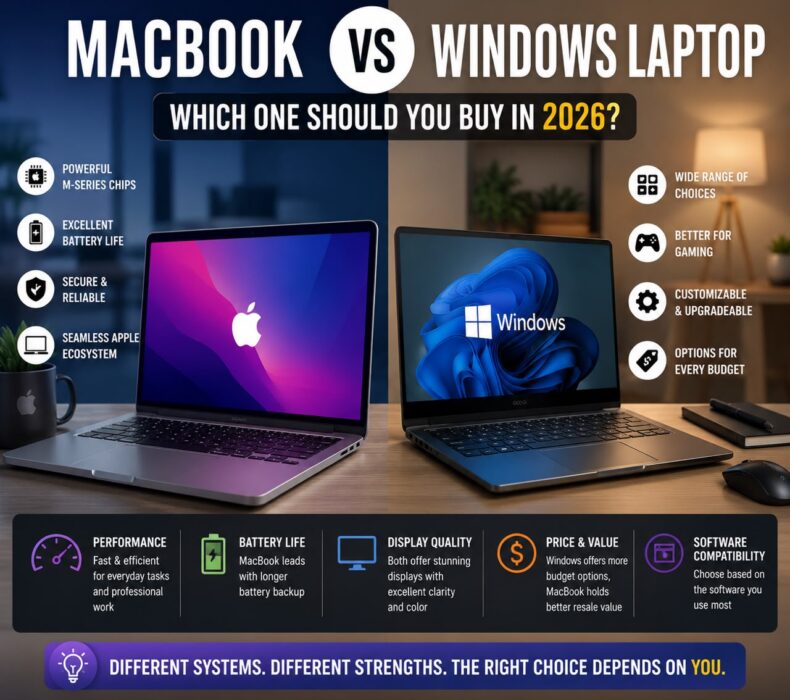
MacBook vs Windows Laptop: Which One Should You Buy in 2026?- The Honest Buyer’s Guide for Students, Professionals, Creators, and Everyday Users
Buying a laptop in 2026 is no longer as simple as choosing the most popular brand. In fact, one of the biggest decisions buyers face today is whether to buy a MacBook or a Windows laptop. Both options are more powerful than ever. Nevertheless, they serve different types of users.
On one hand, Apple’s MacBook lineup offers exceptional battery life, premium design, and an ecosystem that works seamlessly with the iPhone, iPad, and Apple Watch. On the other hand, Windows laptops provide greater variety, better gaming support, and options for virtually every budget.
Therefore, if you are trying to decide between a MacBook and a Windows laptop, this in-depth comparison will help you choose the device that truly fits your lifestyle and workload.
The Real Difference Between MacBook and Windows
At the core, the difference is not just hardware. Rather, it is about philosophy.
Apple controls both the hardware and software. Consequently, MacBook feels polished, efficient, and remarkably consistent.
Microsoft, by contrast, licenses Windows to many manufacturers including Dell, HP, Lenovo, and ASUS. As a result, buyers enjoy far more choices in design, specifications, and pricing.
In short:
* MacBook = curated premium experience.
* Windows = maximum flexibility and variety.
Design and Build Quality
Apple has set the benchmark for laptop design for years. MacBooks feature:
* Precision-milled aluminum bodies.
* Excellent trackpads.
* Silent, efficient performance.
* Minimalist aesthetics.
However, premium Windows models now match or even exceed Apple in some areas.
For example:
* Dell XPS 14
* HP Spectre x360
* Lenovo Yoga 9i
Therefore, if design matters, both platforms offer exceptional options.
Performance: Which One Is Faster?
Apple’s M-series chips are incredibly efficient. They deliver desktop-level performance while consuming very little power.
As a result, even the Apple MacBook Air M4 can handle:
* 4K video editing
* Graphic design
* Programming
* Multitasking
Meanwhile, Windows laptops can be configured with:
* Intel Core Ultra processors
* AMD Ryzen AI chips
* NVIDIA RTX graphics
Consequently, Windows machines can outperform MacBooks in gaming and specialized workloads.
Battery Life: MacBook Still Leads
This is where MacBooks continue to dominate.
Many MacBooks deliver 15–20 hours of real-world usage. More importantly, they maintain high performance even on battery power.
Although premium Windows laptops have improved significantly, they still tend to average 8–14 hours depending on configuration. Therefore, if battery life is your top priority, a MacBook is often the best choice.
Software Compatibility
Choose MacBook If You Use:
* Final Cut Pro
* Logic Pro
* Xcode
* Adobe Creative Cloud
* Apple ecosystem apps
Choose Windows If You Use:
* AutoCAD
* SolidWorks
* Revit
* QuickBooks desktop
* Most enterprise software
In addition, many schools and workplaces rely heavily on Windows-only applications.
Therefore, always check software compatibility before buying.
Gaming: Windows Wins Easily. If gaming matters, the answer is simple.
Windows laptops support:
* Steam’s full library
* NVIDIA and AMD graphics
* Game optimization tools
* High-refresh displays
Mac gaming has improved, but it still trails far behind.
Therefore, gamers should choose Windows.
Upgradeability and Repairs
Most modern MacBooks have soldered RAM and storage, which means you cannot upgrade them later.
Some Windows laptops, however, still allow:
* RAM upgrades
* SSD replacements
* Easier repairs
Consequently, Windows offers more long-term flexibility.
Hidden Costs Most Buyers Ignore
Here is a practical insight many people miss:
MacBook Hidden Costs
* USB-C adapters
* Higher repair costs
* Expensive storage upgrades
Windows Hidden Costs
* Lower battery life on cheaper models
* Potential bloatware
* Variable build quality
Therefore, consider the total ownership cost, not just the purchase price.
Resale Value
MacBooks typically retain their value better than Windows laptops.
For example, a three-year-old MacBook Air often sells for a strong percentage of its original price.
As a result, your long-term cost may be lower despite the higher upfront investment.
Best MacBooks to Buy in 2026
* Apple MacBook Air M4
* Apple MacBook Pro M4
Best Windows Laptops to Buy in 2026
* Dell XPS 14
* HP Spectre x360
* ASUS Zenbook 14
* Lenovo Yoga 9i
Who Should Buy a MacBook?
A MacBook is ideal if you:
* Already own an iPhone or iPad.
* Value exceptional battery life.
* Prefer a polished user experience.
* Work in creative fields.
* Want strong resale value.
Who Should Buy a Windows Laptop?
A Windows laptop is best if you:
* Need specific business or engineering software.
* Play games.
* Want more options at different price points.
* Prefer upgrade flexibility.
Honest Recommendation
If you are a student, writer, digital marketer, or content creator and you can afford it, the MacBook Air M4 is one of the best all-around laptops in 2026.
However, if you need affordability, gaming, or specialized software, a quality Windows laptop is the smarter choice.
Final Verdict
The MacBook vs Windows laptop debate is not about which platform is objectively better. Instead, it is about which one better supports your work, hobbies, and budget.
Choose a MacBook for simplicity, battery life, and ecosystem integration.
Choose Windows for versatility, gaming, and broader software support.
Ultimately, the best laptop is the one that helps you work smarter and enjoy your digital life with fewer compromises.
Related Posts:


- Tags:
- Laptops


 Get it on
  Download on the