






- Esther Obaji
- July 13, 2026
- No Comments
If you’ve recently encountered a Moniepoint Transfer Failed error, your account’s Know Your Customer (KYC) level may be one of the reasons. Moniepoint applies different KYC levels to protect users, comply with financial regulations, and determine how much money can be sent or received. By upgrading your KYC level, you can unlock higher transaction limits, enjoy smoother banking services, and reduce the likelihood of transfer failures caused by account restrictions. This guide explains everything you need to know about upgrading your Moniepoint KYC level safely and successfully.
What Is Moniepoint KYC?
KYC stands for Know Your Customer.
It is a verification process used by financial institutions to confirm a customer’s identity before providing banking services.
The process helps:
- Prevent fraud
- Improve account security
- Meet regulatory requirements
- Reduce financial crimes
- Protect customer funds
Every Moniepoint account is assigned a verification level that determines its transaction limits and available features.
Why You May See a Moniepoint Transfer Failed Error
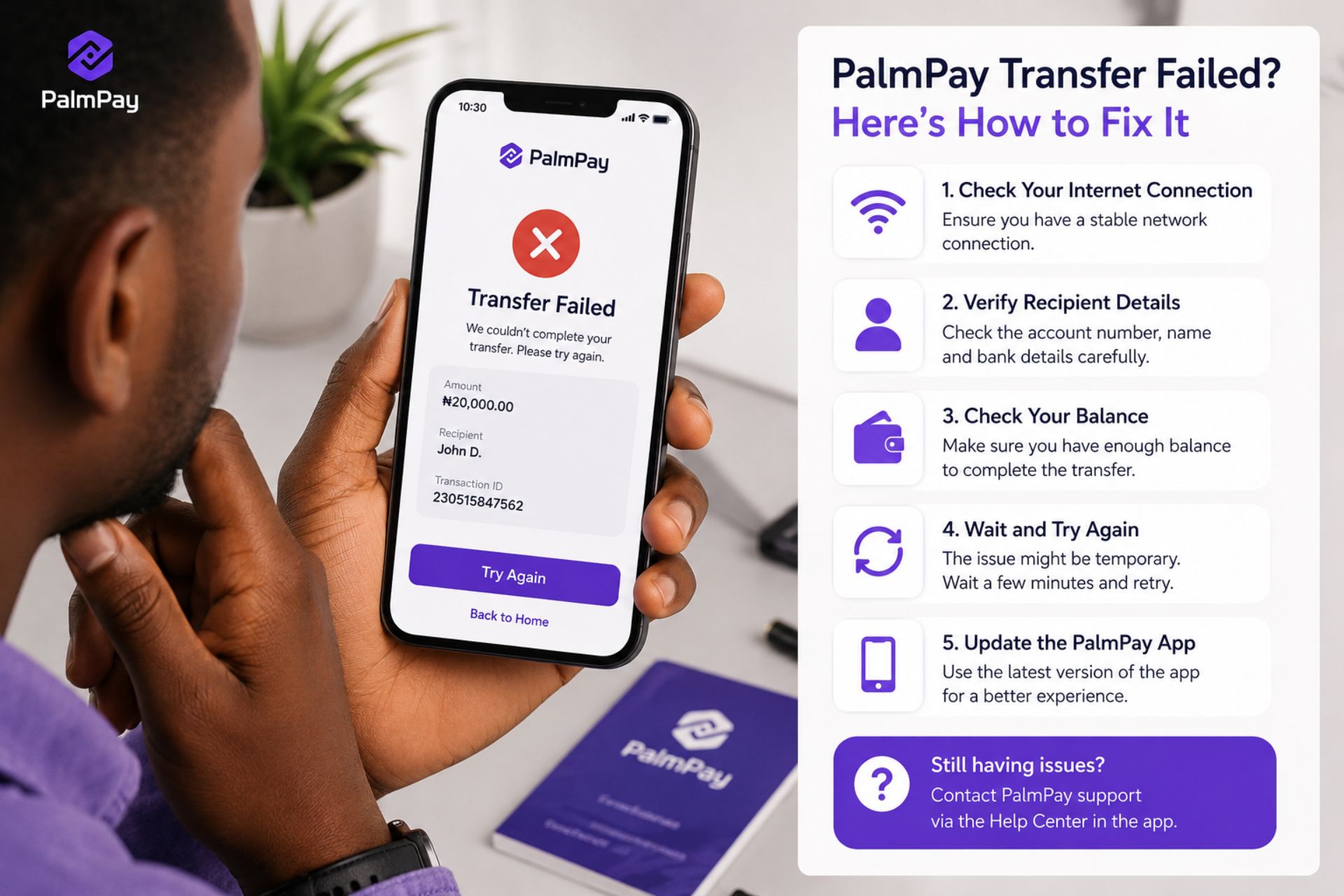
A Moniepoint Transfer Failed message can appear for several reasons, including:
- Your account has reached its transaction limit.
- Your KYC level is incomplete.
- Network connectivity issues.
- Temporary system maintenance.
- Incorrect beneficiary details.
- Security checks on your account.
If the issue is related to KYC limits, upgrading your account is usually the recommended solution.
Benefits of Upgrading Your Moniepoint KYC Level
Upgrading your verification level provides several advantages.
Higher Transaction Limits
A verified account generally allows larger daily or monthly transaction limits, subject to Moniepoint’s current policies.
Fewer Transfer Restrictions
Completing KYC verification can reduce transfer interruptions caused by account limitations.
Improved Account Security
Identity verification helps protect your account against unauthorized access.
Access to More Features
Higher verification levels may unlock additional banking and business services offered by Moniepoint.
Requirements to Upgrade Your Moniepoint KYC Level
Before starting the process, ensure you have the required documents.
Commonly requested information may include:
- Valid government-issued identification
- Bank Verification Number (BVN)
- Passport photograph (if required)
- Active phone number
- Residential address
- Utility bill or proof of address (where applicable)
Requirements may vary depending on your account type and the verification level you’re applying for.
How to Upgrade Your Moniepoint KYC Level
Step 1: Open the Moniepoint App
Sign in using your registered phone number and password or biometric login.
Ensure you are using the latest version of the app.
Step 2: Navigate to Your Profile
Go to your account settings or profile section.
Look for options related to:
- Verification
- KYC
- Account Upgrade
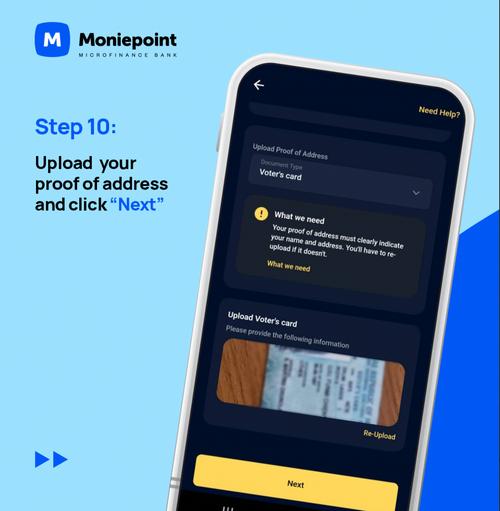
Step 3: Upload Required Documents
Follow the instructions carefully when uploading your documents.
Ensure that:
- Images are clear.
- Information is readable.
- Documents are valid and not expired.
Poor-quality uploads may delay approval.
Step 4: Verify Your Information
Review all personal details before submitting your application.
Check:
- Full name
- Date of birth
- Phone number
- BVN
- Address
Accurate information improves the chances of successful verification.
Step 5: Submit Your Application
After confirming your details, submit the verification request.
You may receive updates through:
- The Moniepoint app
- Email notifications
- SMS messages
How Long Does KYC Verification Take?
Verification times vary depending on:
- Document quality
- Verification volume
- Additional security checks
Some requests are processed relatively quickly, while others may require additional review.
Tips for Faster Approval
To help avoid delays:
Use Valid Documents
Ensure your identification is current and matches your account details.
Upload Clear Images
Avoid blurry or cropped document photos.
Match Your BVN Information
Your account information should match your BVN records where applicable.
Complete Every Required Field
Missing information can delay the review process.
What to Do If Verification Is Delayed
If your verification takes longer than expected:
- Check your email for updates.
- Review notifications in the Moniepoint app.
- Ensure all requested documents were submitted.
- Contact Moniepoint customer support if necessary.
Keep your application reference details for future follow-up.
Other Causes of Moniepoint Transfer Failed Errors
Although KYC is a common reason, other issues may also prevent successful transfers.
Network Problems
Temporary network interruptions can affect transaction processing.
Incorrect Account Details
Double-check beneficiary information before sending money.
Insufficient Balance
Ensure your account has enough funds to cover both the transfer amount and any applicable fees.
System Maintenance
Occasionally, scheduled maintenance may temporarily affect banking services.
Tips to Prevent Transfer Problems
To reduce the likelihood of future transfer issues:
- Complete your KYC verification early.
- Keep your personal information updated.
- Verify recipient details carefully.
- Maintain a stable internet connection.
- Keep the Moniepoint app updated.
These simple practices can improve your overall banking experience.
Frequently Asked Questions
Why does Moniepoint say my transfer failed?
A Moniepoint Transfer Failed message may occur due to KYC limits, incorrect recipient details, network issues, insufficient balance, or temporary system interruptions.
Can upgrading my KYC increase my transfer limit?
Yes. Higher KYC levels generally provide increased transaction limits, subject to Moniepoint’s current policies.
Which documents are usually required?
Common requirements include a valid ID, BVN, and other verification documents depending on your account type.
Is KYC verification free?
Check the latest Moniepoint policies, as verification requirements and procedures may change over time.
Can I still receive money while my KYC is pending?
This depends on your current verification level and Moniepoint’s transaction policies.
Conclusion
Upgrading your Moniepoint KYC level is one of the most effective ways to reduce Moniepoint Transfer Failed issues related to transaction limits and account restrictions. By completing the verification process with accurate information and valid documents, you can enjoy higher transfer limits, improved security, and a smoother banking experience. If you experience delays or persistent transfer problems, contact Moniepoint’s official customer support for assistance and avoid relying on unofficial sources.




 Get it on
  Download on the