






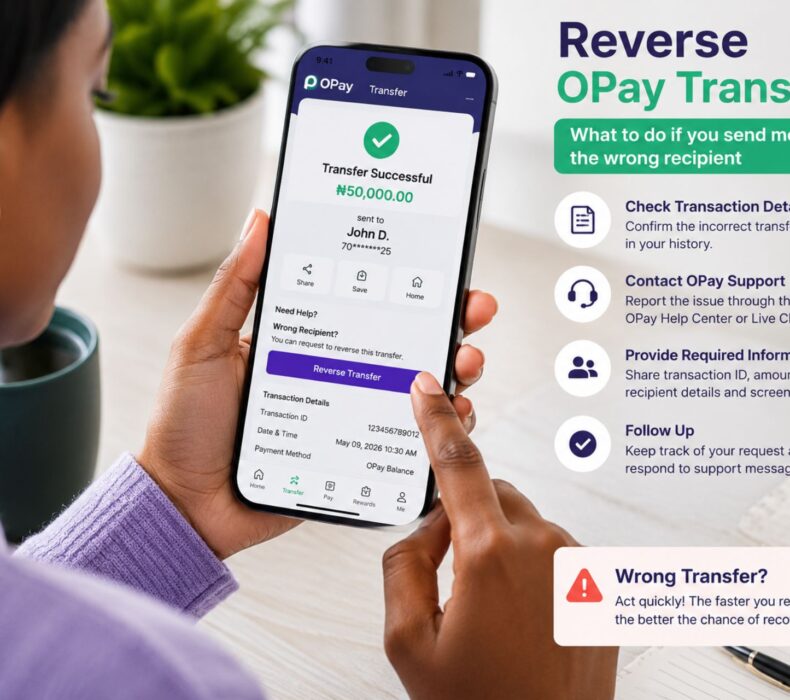
Sending money to the wrong account can happen to anyone, especially when making quick payments. Fortunately, if you need to Reverse OPay Transfer, there are official steps you can follow to improve your chances of recovering your funds. Although not every incorrect transfer can be reversed automatically, acting immediately, contacting customer support, and providing accurate transaction details can make a significant difference. This guide explains everything you need to know about reversing an OPay transfer safely and efficiently.
Can You Reverse an OPay Transfer?
Yes, in some situations you may be able to Reverse OPay Transfer successfully. However, whether the funds can be recovered depends on factors such as:
- Whether the money has already been withdrawn or spent.
- Whether the recipient is willing to cooperate.
- The type of transfer made.
- How quickly the issue is reported.
Therefore, the sooner you report the mistake, the better your chances of recovery.
Common Reasons for Wrong Transfers
Mistakes usually happen because of:
- Entering an incorrect account number.
- Selecting the wrong beneficiary.
- Typing the wrong transfer amount.
- Sending money too quickly without reviewing the details.
- Saving outdated beneficiary information.
Fortunately, most of these mistakes can be avoided by carefully checking transaction details before confirming payment.
Step-by-Step Guide to Reverse an OPay Transfer
Step 1: Stay Calm and Act Immediately
Do not panic if you notice the mistake.
Instead:
- Check your transaction history.
- Confirm the recipient’s account number.
- Take a screenshot of the transaction.
- Note the transaction reference number.
These details will be useful when contacting customer support.
Step 2: Contact OPay Customer Support
Immediately report the incorrect transfer through OPay’s official support channels.
Be prepared to provide:
- Your full name
- Registered phone number
- Transaction ID
- Amount transferred
- Date and time of transfer
- Recipient account details
- A brief explanation of what happened
Providing complete information helps the support team investigate your request more quickly.
Step 3: Contact the Recipient (If Possible)
If you recognize the recipient or have a legitimate way to contact them, politely explain the situation and request a refund.
Many wrong transfers are resolved this way when the recipient agrees to return the funds.
Avoid harassment or threats, as these are unlikely to help and could create additional problems.
Step 4: Monitor Your Complaint
After reporting the issue:
- Keep your complaint reference number.
- Check your email and app notifications.
- Respond promptly if additional information is requested.
Following up professionally can help move the process forward.
Situations Where a Transfer May Be Reversed
A Reverse OPay Transfer request has a better chance of success when:
The Recipient Has Not Used the Funds
If the money is still available in the recipient’s account, recovery may be easier.
The Recipient Cooperates
Some recipients voluntarily return funds once they are informed of the mistake.
The Transfer Is Reported Quickly
Reporting the issue immediately allows support teams to begin investigating sooner.
Situations Where Recovery May Be Difficult
Unfortunately, reversing a transfer may be challenging if:
- The funds have already been withdrawn.
- The recipient refuses to cooperate.
- Incorrect transaction information is provided.
- The report is made after a long delay.
Even in these situations, it is still advisable to report the incident through official channels.
Tips to Avoid Wrong Transfers
Preventing mistakes is always better than trying to recover money afterward.
Verify the Recipient’s Name
Always check that the displayed account name matches the intended recipient before confirming payment.
Double-Check the Account Number
Review every digit carefully to avoid sending money to the wrong person.
Confirm the Transfer Amount
Take an extra moment to ensure the amount entered is correct.
Save Trusted Beneficiaries
Saving verified beneficiaries can reduce the risk of future errors.
Avoid Rushing
Many mistakes happen because users are in a hurry. Slowing down for a few seconds can save significant time and stress later.
What Not to Do
If you’ve made an incorrect transfer, avoid these actions:
- Do not send repeated transfers hoping to fix the mistake.
- Do not share your PIN or one-time password (OTP).
- Do not disclose your login credentials to anyone claiming they can recover your funds.
- Do not rely on unofficial agents or social media accounts promising guaranteed reversals.
Always use OPay’s official support channels.
How Long Does a Reversal Take?
The time required varies depending on the circumstances.
Factors include:
- The complexity of the investigation.
- The cooperation of the recipient.
- The type of transfer.
- Internal review processes.
Some cases are resolved relatively quickly, while others may require additional time.
Security Tips for OPay Users
To protect your account:
Enable Biometric Login
Use fingerprint or facial recognition where available.
Use a Strong Password
Avoid simple passwords and update them regularly.
Keep the App Updated
Install updates promptly to benefit from the latest security improvements.
Never Share Your OTP
Your OTP should remain confidential at all times.
Watch for Fraud
Be cautious of unsolicited messages claiming they can reverse transfers for a fee.
Frequently Asked Questions
Can I reverse an OPay transfer immediately?
You should report the issue as soon as possible. While not every transfer can be reversed, early reporting improves the chances of a successful resolution.
Can OPay force a recipient to return the money?
Recovery depends on the circumstances, applicable regulations, and cooperation where necessary. OPay will investigate reported cases according to its procedures.
What information do I need to report a wrong transfer?
You’ll typically need your transaction reference, transfer amount, date, recipient details, and the phone number linked to your account.
Is there a fee to request a reversal?
Policies may change over time. Check the latest information from OPay or its customer support if you have concerns about applicable charges.
Can I recover money sent to the wrong bank account?
Recovery is sometimes possible, but the outcome depends on the specific situation and how quickly the issue is reported.
Final Thoughts
Making an incorrect transfer can be stressful, but knowing how to Reverse OPay Transfer can help you respond effectively. The most important step is to act immediately, gather all transaction details, and report the issue through OPay’s official customer support. Additionally, practicing safe transfer habits—such as confirming account numbers and recipient names before sending money—can greatly reduce the likelihood of future mistakes. With careful attention and prompt action, you can improve your chances of resolving transfer issues successfully.


 Get it on
  Download on the